
Crimdio
Crimdio answers the question "which file did I put that in?" for Windows users. Spreadsheets, documents and text files — search a whole folder at once.
- Free
- Windows
Get the app
Also available from

* The version distributed on external sites may not be the latest.
Features
- Searches spreadsheet files (xlsx / xlsm / xls / ods / csv) — including cells, shapes, cell comments and formulas
- Also handles document files (docx / pptx / odt / odp / PDF and more)
- Google Sheets, Docs and Slides (.gsheet / .gdoc / .gslides) can be searched too (on first use, you allow access with your Google account and select the files to search; Crimdio only reads their contents and does not write to them)
- Searches text files too (txt / csv / log / md — you can add any other extensions)
- Exact match, case sensitivity, full-/half-width distinction and regular expressions
- Double-click a result to jump to the match (depends on file format and application)
- Export results to a file or build a table of matching rows
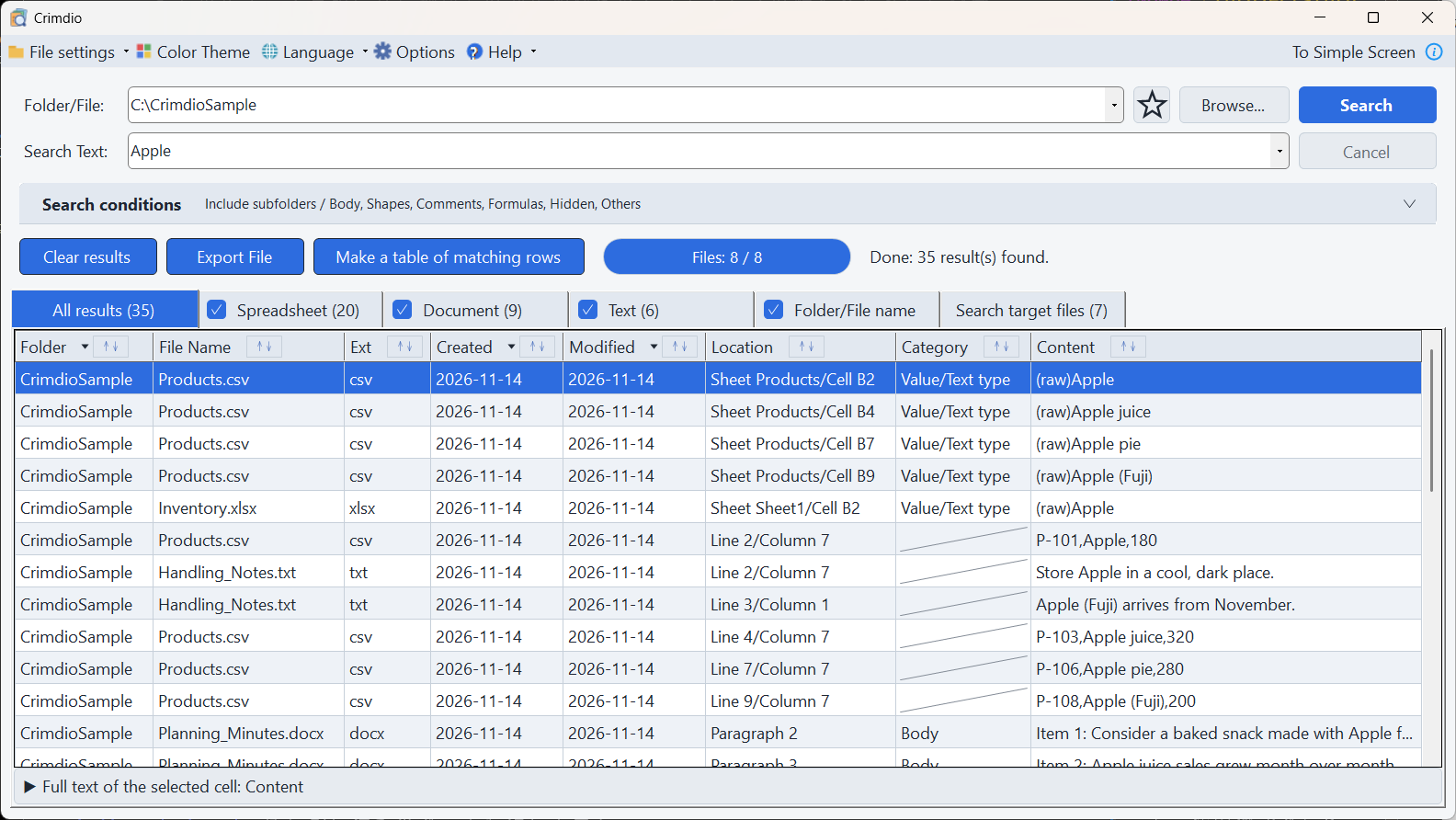
- Switch between a "Simple Screen", where you just enter a location and words, and an "Advanced Screen" with detailed settings
- UI in five languages (Japanese, English, Simplified/Traditional Chinese, Korean)
- Seven color themes to choose from
- Your files are never modified — Crimdio opens them read-only and never writes to them
- No telemetry and no crash reports are collected — searching stays on your PC
Search multiple files for text at once
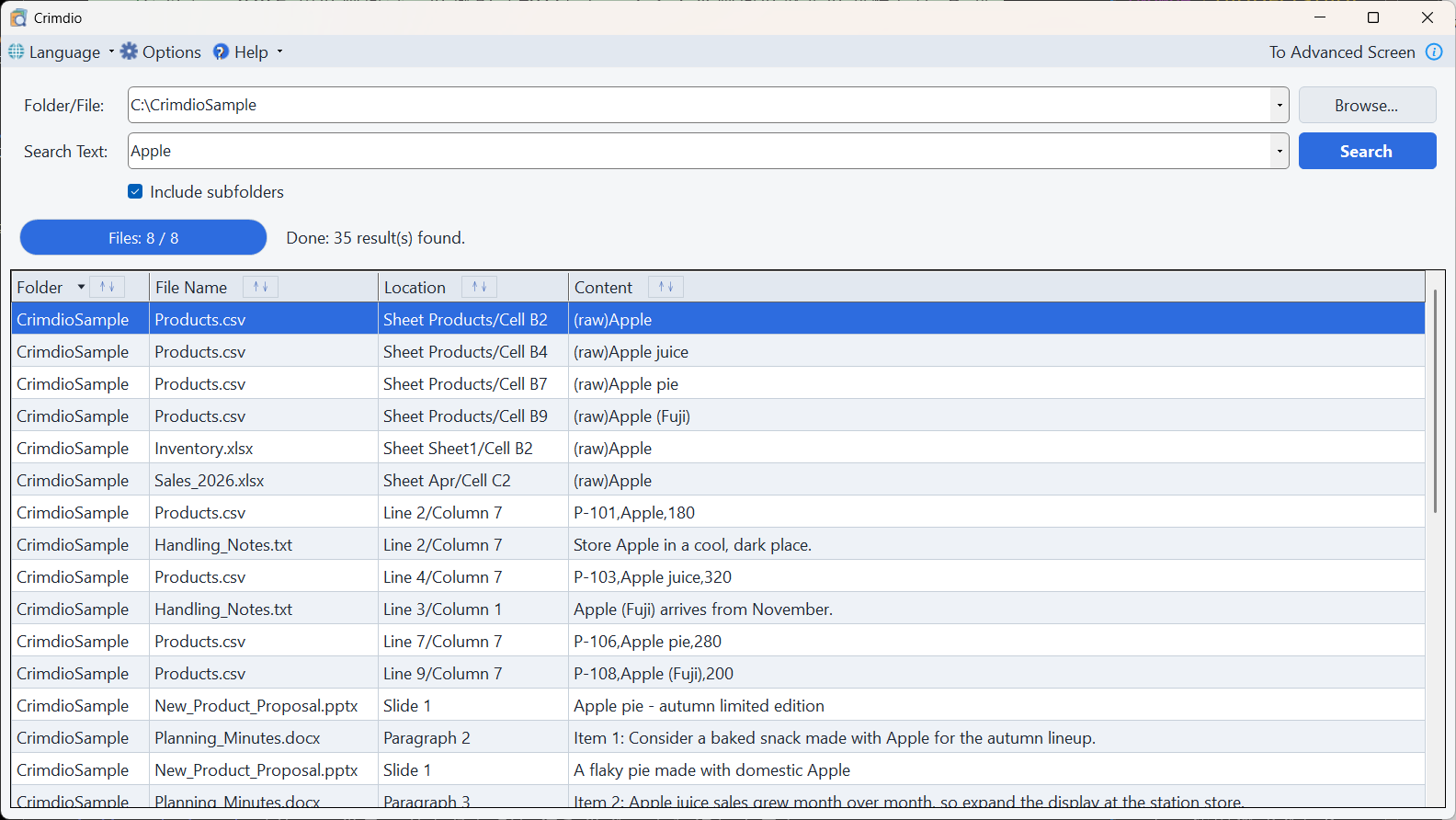
Pick a folder, type a search term, and Crimdio searches multiple files at once, including subfolders. Each hit is listed with exactly where it is (sheet, cell, paragraph, page or line). Depending on the file format, text in shapes and cell comments can also be searched.
Depending on the combination of file format and the application that opens it, a double-click can also open the match. You can also export the results to a file, or build a single table that collects all the matching rows.
Google Sheets, Docs and Slides can be searched too
If you include the .gsheet / .gdoc / .gslides files created by Google Drive for desktop in a
search, Crimdio reads and searches their contents within the scope you authorize with your own
Google account. On the first search, you allow access with your Google account and select the files
to search in your browser. Crimdio can read only the files you select, and it only reads their
contents (it does not write, delete or change sharing settings). You can disconnect at any time from
the Options screen. This feature is available from version 1.2.0.
Your files are never modified
Crimdio opens the files it searches read-only and never writes to them. Searching does not change the contents or the modification date of your files (and files left open in Excel can still be searched, because Crimdio opens them for shared reading).
However, if you double-click a result and then edit and save the file in Excel or Word, that file changes — but Crimdio itself never saves it.
No usage data is collected
Crimdio collects no usage statistics (telemetry) and no crash reports. Folder names, file names, search terms and the contents of your files are never sent to the developer or to any third party.
- Searching and displaying results happen entirely on your own PC. File contents never leave the machine.
- Settings and folder history are stored only on your PC (in your user folder). Diagnostic logging is off by default, and when it is enabled it only writes to a local file.
- There is no automatic update check either.
- The app itself does not connect to the network (except for communication with Google servers when you have authorized Google integration; the retrieved content is processed only on your PC, and there is no developer server). Help and store links open in your default browser.
- No ads are shown (and no third-party ad networks or behavioral tracking are used).
System requirements
- OS
- Windows 11 (64-bit) / Windows 10 (version 1809 or later, 64-bit)
- Memory
- 4 GB or more recommended
- Storage
- 200 MB or more free space
- Other
- .NET runtime included (no separate installation required)